Business Central and Power BI
Getting insights into your Business Central data is easy with Power BI - a data visualization system from Microsoft. Power BI retrieves Business Central data allowing you to build dashboards and reports based on that data. Power BI provides a flexible alternative to reports built in Business Central, enabling you drill down and customize the visualization, and even merge data from different companies in Business Central. Some Power BI reports can also be embedded in Business Central and viewed without leaving the system. More complex dashboards are better experienced from the Power BI web site.
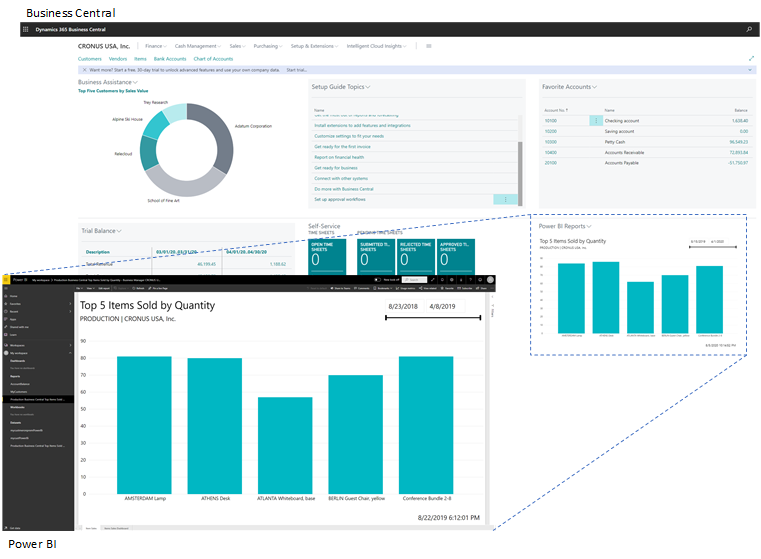
What you can do with Power BI and Business Central
There are various features for working with Business Central and Power BI. Some things you can do from Power BI, while other things are done from Business Central. Also, some features are only available with Business Central online, not on-premises. The following table gives you an overview.
| Feature | Description | Online | On-premises | More information |
|---|---|---|---|---|
| View Business Central data in Power BI | You can view your data from Business Central in reports in Power BI. Business Central online includes some predefined Power BI reports. Or your organization might have made some custom reports available to you. |  |
|
See... |
| View Power BI reports in the Business Central client. | Power BI reports that display Business Central data can be embedded directly in parts Business Central pages. You can switch the part to display any report that is made available to you. | |
* |
See.... |
| Create reports and dashboards in Power BI that display Business Central data. | Use Power BI Desktop to create your own reports and dashboards. You can publish the reports to your own Power BI Service or share them with others within your organization. | |
|
See... |
| Business Central apps in Power BI | Business Central publishes three apps for Power BI on Microsoft AppSource. These apps create detailed reports and dashboards in your Power BI service for viewing Business Central data. Available apps include:
|
|
See... |
* This feature requires a registered application for Business Central in Microsoft Azure. For more information, see Registering Business Central On-Premises in Azure AD for Integrating with Other Services.
Getting ready to use Power BI
There are a few tasks that must be done before you can start using Power BI with Business Central. The tasks will depend on your role in your organization, and what you want to do with Power BI:
- As a business user, you want to view Power BI reports, either in the Power BI Service or in Business Central
- As an administrator, you're responsible for the management of the organization-wide settings that control how Business Central and Power BI work.
- As a report creator, you want to build custom Power BI reports that you can share with other users.
| Task | Business user | Administrator | Report creator | More information |
|---|---|---|---|---|
| Get a Power BI account. | |
|
|
Go to https://powerbi.microsoft.com. To sign up for an account, use your work email address and password. Sign-up requires that you have a license, but in most cases you should already have a free license, For more information, see Power BI Licensing. |
| Get Power BI Desktop | |
To download, go to Power BI Desktop. For more information, see Get Power BI Desktop. | ||
| Expose Business Central data to Power BI | |
|
Expose data through API pages or OData web services | |
| Enable Power BI integration (on-premises only) |
|
Set up Business Central on-premises for Power BI integration |
See Related Training at Microsoft Learn
See Also
Power BI for consumers
The 'new look' of the Power BI service
Quickstart: Connect to data in Power BI Desktop
Power BI documentation
Business Intelligence
Getting Ready for Doing Business
Importing Business Data from Other Finance Systems
Setting Up Business Central
Using Business Central as a Power BI Data Source
Using Business Central as a Power Apps Data Source
Using Business Central in Power Automate